Event Driven 3d JavaScript
Thomas Kunnumpurath
VP Systems Engineering · Solace
JavaScript is an enormously versatile language with a rich library of frameworks and tools to build everything from static websites (such as this site) to 3D experiences. In this post, I will explain how I created a mini game that uses a mobile device to rotate an onscreen model of a cannon and allows you to launch a cannon ball as well. 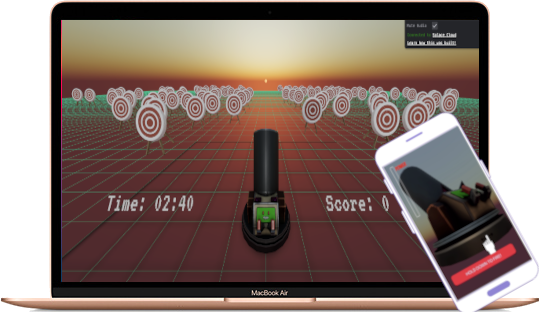
The Tech Stack
Here is the main part of the stack I used to build this application:
• Svelte – The Svelte Javascript framework has become my goto framework for programming interactive UIs. Among many other things, whats great about this framework is that a Svelte App compiles down to pure Javascript and your resultant web-apps become less bloated.
• Threlte – A Svelte library for svelte heavily inspired by react-three-fiber that allows you to easily build interactive 3D applications using Three.js
• Solace PubSub+ – An enterprise grade event broker that has many unique features such as multi-protocol support with a variety of SDKs (such as Java, JavaScript, .NET, Python, GoLang, and C)
Using Solace PubSub+ Topics to enable multi-session play
The Solace PubSub+ Advanced Event Broker is infrastructure that allows you to publish and subscribe to messages with extremely high throughput and low latency. A unique aspect of the Solace PubSub+ Event Broker is the ability to publish on dynamic topics that are simply part of the message as shown below: 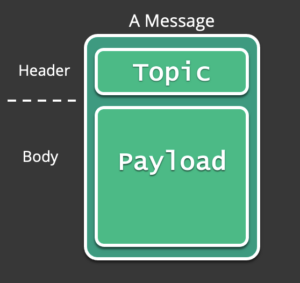
We will take advantage of this feature to create a scalable event driven architecture that can support many concurrent users by prefixing all events sent from the app with a prefix as defined below:
entangled-cannon/[game_session_id]/...Whenever a user enters the web app, a unique Game Session ID will be generated which will ensure that no two players will interrupt each others session.
There are a variety of events that are generated from the application as listed below: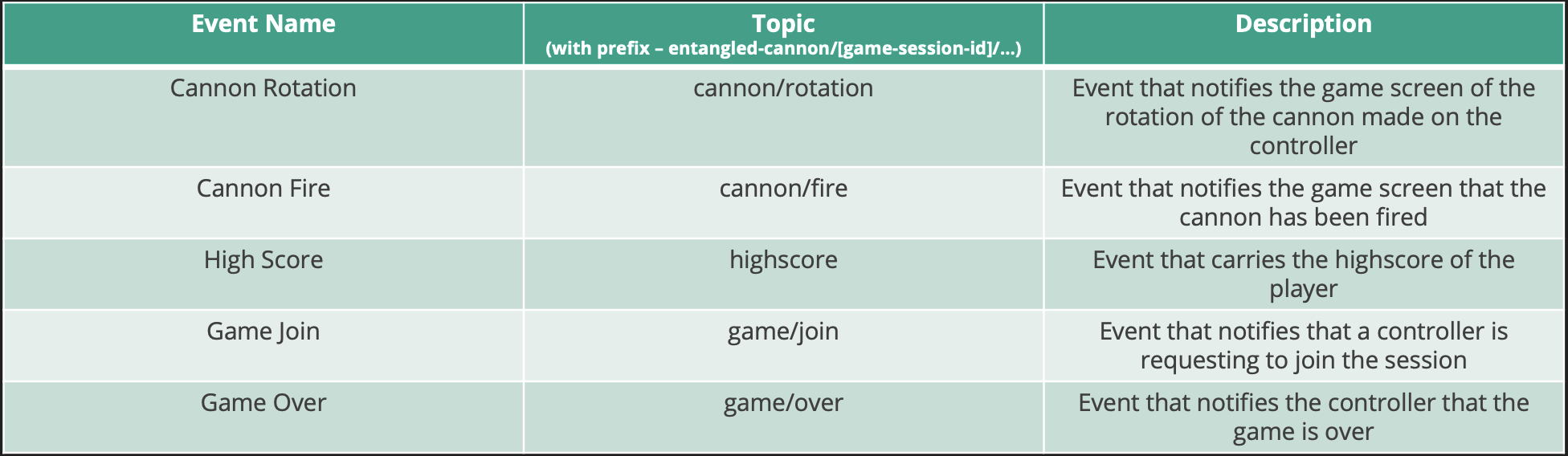
How the cannon rotation is derived
One of the challenging aspects of this application was to figure out how to rotate the cannon based on touch. Essentially when you drag the cannon with your fingers on the mobile phone you are constantly updating the co-ordinates of the pointer (in this case your finger). The Cannon model exposes a few functions:
on:pointerdown -> When the Cannon model was pressed on
on:pointermove -> When the pointer was moved on the Cannon
on:pointerup -> When the press on the Cannon model was released
So the logic will work as follows:
- When the Cannon is pressed on, enable dragging
- When the Pointer moves on the cannon and dragging is enabled, update the difference between the start and the current pointer
- When the pointer is relased, disable dragging
- On every frame render, rotate the cannon by the drag difference amount and publish an event on the
cannon/rotationtopic to update the main game sreen
Conclusion
I’ve described how using Solace PubSub+ with your interactive 3D experiences can uplift the design and create a very scalable architecture. In addition, I explained one of the many challenges encountered while building this project and how it was resolved. There plenty of other interesting challenges such as firing the cannon ball taking into consideration the rotation of the cannon… all of which you can find in the code base here:
https://github.com/TkTheTechie/entangled-cannon
While you are at it, try to get your initials on the leaderboard by playing the game here